FT-1000MP Home CW Station with SDR Panadapter
| Transceiver | Yaesu FT-1000MP (Collins 250 / 500 Hz IF filters) |
|---|---|
| Panadapter | RFSpace SDR-IQ, approx. 190 kHz spectrum |
| Coupler | Broadband Wilkinson divider, 50 Ω ports |
| PC interface | Yaesu SCU-17 (CAT, PTT/FSK, USB audio) |
| Software | DXLab Suite + CW Skimmer + SpotCollector; W3OA bridges or Commander Secondary CAT Port; SDR Console, HDSDR or SpectraVue as alternatives |
| Keying | DTR/RTS, WinKey, or external interface (not CAT text) |
An everyday contest and home CW station built around a Yaesu FT-1000MP: the radio works the contacts, and a Wilkinson-fed SDR brings waterfalls and spectra to the desk.
Rolf L. Heine, DL6ZB
1. Introduction
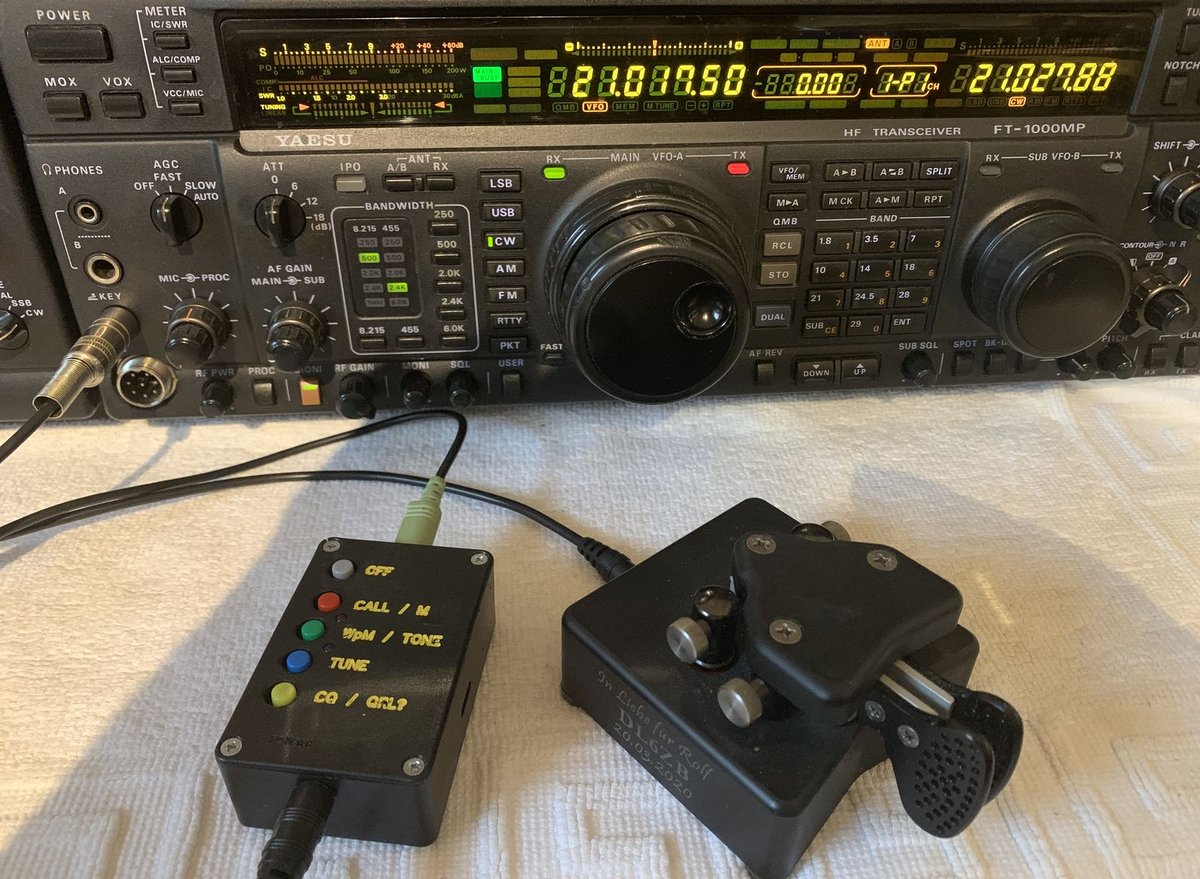
I have been running this FT-1000MP since 1997. I bought it with every crystal filter that was available at the time. Over the years it received a few proven modifications: an INRAD roofing filter in the first IF at 70.455 MHz, the modification against CW key clicks, and a few other improvements. Since then the FT-1000MP has shown quite respectable behavior on the HF bands.
Again and again I was tempted to sell it and buy something more modern. But nothing really convinced me. If you watch the used market carefully, about 700 euros buys you one of the best HF transceivers of its generation today. For CW and everyday contesting it still need not fear comparison.
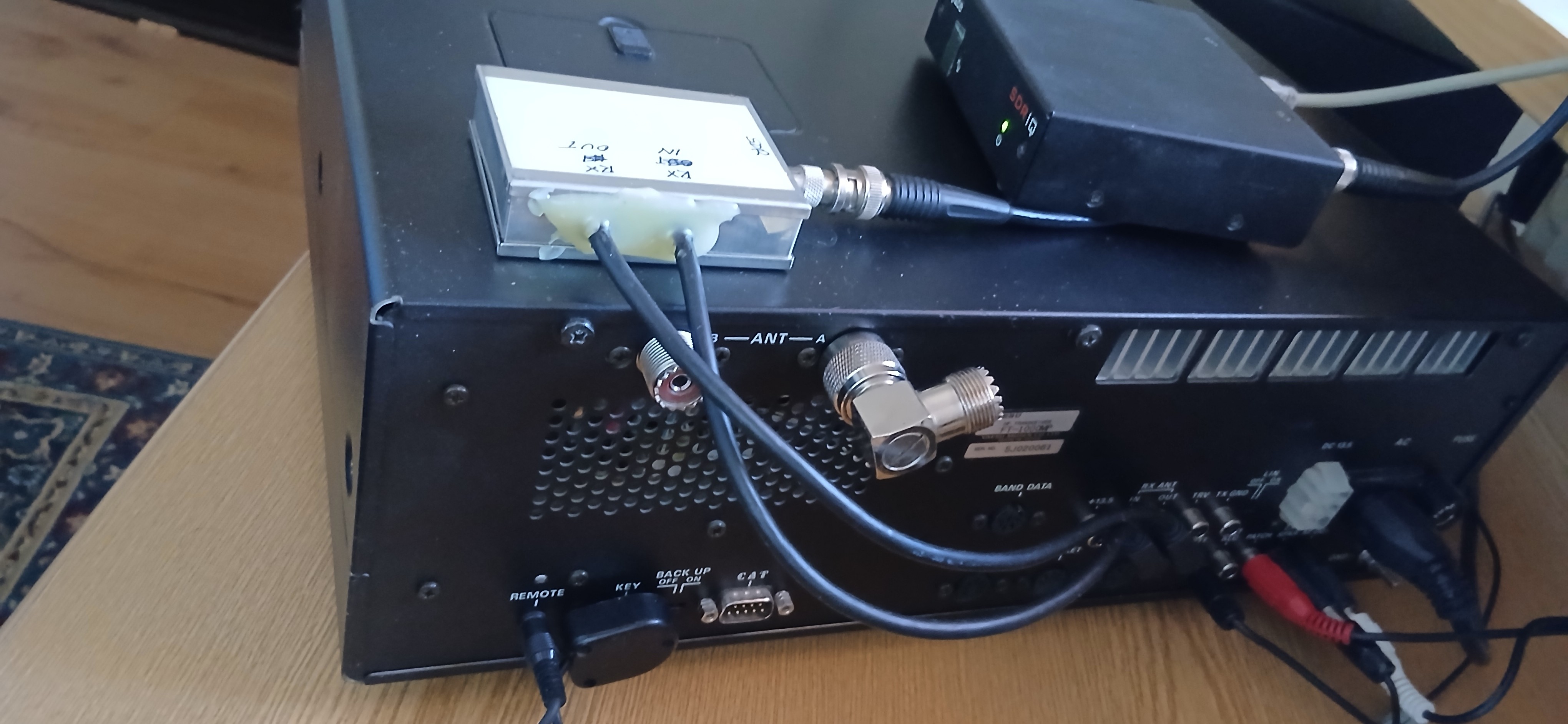
One thing the MP lacks, because it did not exist some 30 years ago: a waterfall and spectrum display from an SDR on the PC screen. That is easy to add, without opening the radio. The RX ANT OUT and RX ANT IN jacks on the rear panel already provide everything needed to connect an SDR. A simple broadband Wilkinson divider is the missing link. It turns the FT-1000MP into a classic superhet transceiver with modern SDR capabilities, and for CW at home and in contests hardly anything is left to wish for.
2. Why the FT-1000MP stays
2.1 Filters in the IF chain
At home I work almost exclusively CW, and the MP in the middle of the desk carries a full filter set — including the Collins mechanical filters at 250 Hz and 500 Hz. For the average amateur — the Otto Normalamateur — it is an excellent contest transceiver in ordinary, all-comers events that do not demand an extreme receiver.
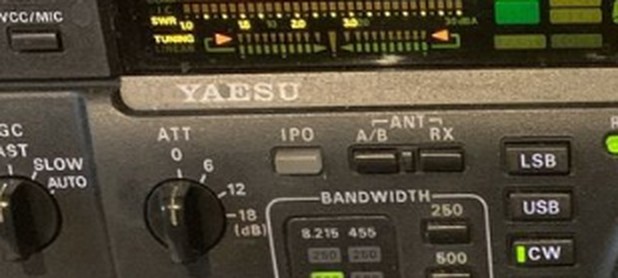
The MP earns its place for a simple reason: the narrow filters sit in the IF chain, where they shape the passband before the rest of the receiver has to deal with strong neighbors. With Collins filters at 250 Hz and 500 Hz installed, the radio asks very little of later DSP. You select the bandwidth on the front panel and listen — the same operating style that serves a quiet evening on 40 meters and a weekend all-comers contest.
Sherwood measures the stock FT-1000MP at about 69 dB of IMD dynamic range at 2 kHz spacing, and about 91 dB at 20 kHz. With the narrow filters in place, close-in behavior sits where many newer Yaesu radios with a 3 kHz roofing filter do not pull ahead for everyday CW. The full filter set — from the narrow CW slots through the wider SSB and AM widths — is available at both IF stages, so the station stays tactile and predictable when the band fills up.
2.2 Division of labor
The MP with its Collins filters makes the QSO. Beside it, the SDR-IQ watches roughly 190 kHz of spectrum and feeds CW Skimmer, so you can see who is calling, who is already in the logbook sense of SpotCollector, and where the next interesting signal sits — without asking the transceiver to be a waterfall. That is the elegant part of the arrangement: a clean split between a first-rate IF receiver and a dedicated wideband SDR.
A built-in scope in a later Yaesu would not replace this for CW. Their roofing filters are not narrower on CW than the filter set already in the MP. The Wilkinson divider is what brings the classic radio into the modern band map, rather than a bigger screen inside a newer chassis.
3. The Wilkinson divider
3.1 Circuit and parts
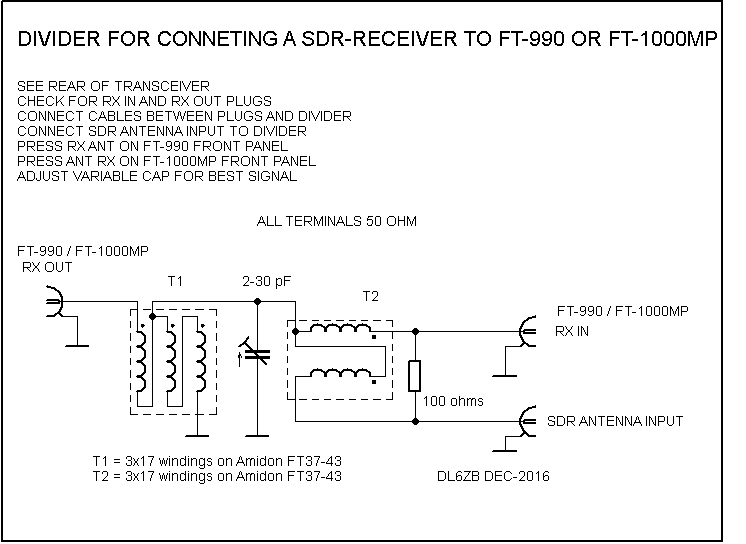
Hardware for the split is a broadband Wilkinson divider. All ports are 50 Ω, and the same circuit works on the Yaesu FT-990 and the FT-1000MP.
Parts:
- T1 and T2: 3 × 17 turns each on an Amidon T37-43 core
- 100 Ω between the two outputs (isolation)
- 2–30 pF to ground at the junction (trimming)
- Transceiver RX OUT to the divider input; RX IN to one output; SDR antenna input to the other
3.2 Connection and transmit protection
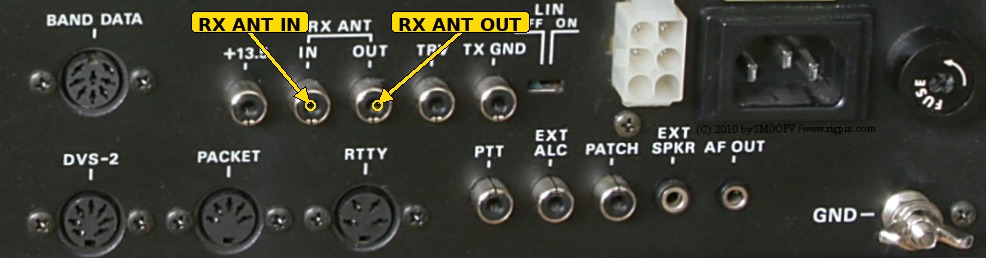
On the front panel, press ANT RX, otherwise the divider is not in the receive path. The tap sits after the transmit/receive switch. When the MP transmits, it opens this path, so the SDR-IQ does not see transmit power. A blocking relay is normally unnecessary. Check once, on the air, that nothing appears at the SDR input on transmit — then leave the arrangement alone.
The divider costs the MP about 3 dB in the receive path. On the HF bands, where band noise normally sets the floor, that is rarely audible; switch ANT RX off if you want the last 3 dB back for a moment.
4. Station wiring
4.1 Block diagram
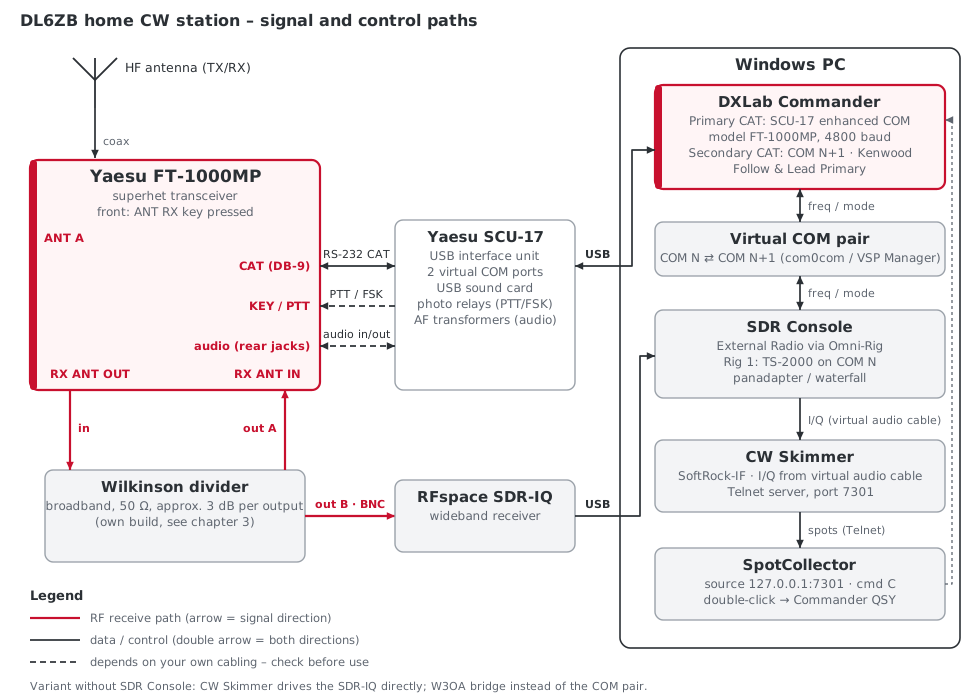
4.2 PC interface: Yaesu SCU-17
Between the PC and the MP sits a Yaesu SCU-17 USB interface unit. One USB cable carries everything the station needs:
- Two virtual COM ports. The Enhanced COM port carries CAT; the Standard COM port carries transmit control (PTT and FSK) through the RTS and DTR lines. By default PTT follows RTS and FSK follows DTR; an internal switch, S1001, swaps the two. Windows assigns the COM numbers; check them in Device Manager under Ports (COM & LPT) (see Yaesu's virtual COM port driver manual). Install the driver before plugging in the SCU-17.
- A USB sound card. It appears in Windows as Microphone (USB Audio CODEC) and Speakers (USB Audio CODEC), with RX and TX level knobs on the front of the unit — useful for digital modes in WinWarbler.
- Isolation. Yaesu uses photo relays on the PTT/FSK outputs and audio transformers in the audio lines, for RF isolation and, in Yaesu's words, "excellent ground isolation" — a common cure for hum and ground loops between PC and radio.
- Bus power. The SCU-17 runs from USB; no extra power supply.
The FT-1000MP has its RS-232 level converter built in, so the SCU-17's CAT/RS-232C jack connects to the MP's 9-pin CAT jack with a straight-through female-to-female cable (one comes with the SCU-17; DXLab lists exactly this cable type for the FT-1000MP). The SCU-17 manual shows no ready-made connection for the FT-1000MP. For other transceivers, Yaesu uses the SCU-17's two 3.5 mm stereo jacks — one for audio in/out, one for PTT/FSK — so audio and keying lines go to the MP's rear-panel jacks with a home-made cable, following the pinouts in both manuals.
In Commander, the Primary CAT port is the SCU-17's Enhanced COM port. DXLab describes the rest of the setup on its SCU-17 wiki page.
4.3 Without an SCU-17
It works without the SCU-17, but it takes more pieces and more care:
- CAT: a USB-to-serial adapter with a genuine FTDI or Prolific chipset and a straight-through 9-pin cable to the MP's CAT jack, set to 4800 baud in the software.
- Keying: CW keying from the PC needs its own interface — DTR or RTS on a serial line driving a transistor or optocoupler stage, or a WinKey.
- Audio: for digital modes you need the PC's sound card, matched levels in both directions, and ideally audio isolation transformers to avoid hum and ground loops between PC and radio.
For a pure CW station with a paddle and Skimmer, the CAT link alone covers most of the work; the SCU-17 earns its keep as soon as PC keying or digital modes join in.
5. Software with DXLab Suite
5.1 Commander and the MP
The station runs on DXLab Suite (AA6YQ). Commander treats the FT-1000MP as its own model: frequency, band, mode, VFO and split run over the CAT connector, typically at 4800 baud. Logging and award tracking sit in DXKeeper; WinWarbler handles digital modes and CW macros when you want them.
5.2 CW Skimmer on the SDR-IQ
CW Skimmer (Afreet / DX Atlas) decodes all CW signals in the SDR-IQ's passband — up to 192 kHz with this receiver. In the basic setup, Skimmer drives the SDR-IQ itself (hardware type SDR IQ on the Radio tab). DXLab collects the setup steps on the wiki page Configuring CW Skimmer to Interoperate With DXLab.
5.3 The W3OA bridges
Two small bridges by Dick Williams, W3OA, keep the pieces talking without sharing the CAT port:
- SkimmerToCommander links Skimmer and Commander over Telnet and DDE. A click in the waterfall sets the MP; turning the VFO pulls Skimmer along. W3OA originally proved the bridge on an FT-1000MP Mark-V with an SDR-IQ; on the MP the same setup applies. For a wideband receiver connected to an antenna — exactly this station — DXLab recommends this bridge on its SkimmerCommander wiki page and lists it among the bridges on the download page.
- SkimmerToDXKeeper passes a callsign clicked in CW Skimmer to DXKeeper, DXView, PropView, Pathfinder and WinWarbler. With Commander running, the DXK+WW option can also QSY the radio to that station.
Both W3OA pages are still the URLs that DXLab Suite points to; the byethost host has been intermittent (HTTP 502 observed in October 2026). If a page fails to load, search the Internet Archive for SkimmerToCommander.html or SkimmerToDXKeeper.html, keep the DXLab download and wiki pages as the stable index — or use Commander's Secondary CAT Port (chapter 5.5), which needs no bridge at all.
5.4 CW Skimmer as a SpotCollector source
Decoded callsigns appear in SpotCollector once CW Skimmer is entered as a spot source. First switch on Skimmer's Telnet server:
- In CW Skimmer, open View → Settings and select the Telnet tab.
- Set Port to 7301.
- Check Enable Telnet Server and click OK.
Then, in SpotCollector's Configuration window, Spot Sources tab, pick a free row in the Telnet DXClusters panel:
- Host address
127.0.0.1, Port 7301. - Caption CW Skimmer.
- Username your own callsign; leave the Password empty.
- Cmd
C. - Check Enable, Auto and Hide.
SpotCollector decorates these spots with the same rules as cluster spots — needed, worked, confirmed, LoTW, eQSL. A double-click sets the MP on frequency through Commander.
These spots are only your own. They show what the SDR-IQ hears on your antenna, not what a worldwide cluster reports. False fragments are decorated too when a callsign looks formally valid, so keep a tight window around the working frequency and avoid an overly aggressive sensitivity. Cluster spots and Skimmer spots can run in parallel; for home CW and everyday contests, the local Skimmer source is the more accurate one, because it only lists signals that are actually present.
5.5 Commander's Secondary CAT Port
Commander has a second CAT port. With the behavior Follow & Lead Primary, Commander, the FT-1000MP and the program on the second port track each other's frequency and mode (Commander configuration help). A program on the same PC is reached through a connected pair of virtual COM ports. That is the key to a panadapter that follows the MP: turn the VFO and the SDR display moves with it; click in the waterfall and the MP goes there — without the W3OA bridge.
One limit first. CW Skimmer cannot simply be pointed at the Secondary CAT Port while it drives the SDR-IQ itself: in SDR-IQ mode, Skimmer does not use its CAT interface at all (CW Skimmer manual), and for this case DXLab recommends the W3OA bridge (SkimmerCommander). On the Secondary CAT route, an SDR console — here SDR Console by Simon Brown, G4ELI — runs the SDR-IQ, follows Commander, and passes the I/Q signal on to CW Skimmer through a virtual audio cable. Joe Subich, W4TV, documents exactly this chain on the DXLab wiki: SDR Console and CW Skimmer with a transceiver and SDR hardware. The steps below follow that page.
5.5.1 What you need
- A connected pair of virtual COM ports: com0com or VSP Manager (both free for licensed amateurs), or a FabulaTech virtual serial port (DXLab overview).
- Omni-Rig — SDR Console uses it for its External Radio function.
- SDR Console with the SDR-IQ already working on its own.
- For CW Skimmer: a virtual audio cable such as VB-CABLE.
The examples use COM13 and COM14. Any free pair will do; write your own numbers down.
5.5.2 Step 1: create the virtual COM pair
- Install com0com. In the Choose Components step, clear the CNCA0 <-> CNCB0 box.
- Start
setupg.exefrom the com0com folder. - Click Add Pair and set the two ports to COM13 and COM14. Click Apply.
com0com recreates the pair automatically after every Windows restart (DXLab: com0com).
5.5.3 Step 2: configure Commander
The Primary CAT port stays on the MP (radio model FT-1000MP, 4800 baud). In Commander's Configuration window, Ports tab, Secondary CAT Serial Port panel:
- CAT protocol: Kenwood. The protocol need not match the radio — the MP keeps talking Yaesu on the primary port.
- Select Follow & Lead Primary.
- If the SDR display should follow VFO B in split, check Follow & Lead Alternate VFO when Split. (Only with an antenna tap like this one — not with an IF tap.)
- Port#: 14 (the second COM port of the pair).
- Baud 115200, Word 8, Parity None, Stop 1.
- DTR Off, RTS Off.
- Check Enable.
5.5.4 Step 3: configure SDR Console
- In SDR Console, select View → More Options, check External Radio, and restart the program.
- Press the ? button in the External Radio display to open its options, then the Omni-Rig button.
- On the Radio 1 tab: Rig type TS-2000, Port COM13, Baud rate 115200, Data bits 8, Parity None, Stop bits 1, RTS and DTR Low, Poll int., ms 100 (500 if the link becomes unreliable). Click OK.
- Check all four Tracking boxes: Radio → SDR (frequency and mode) lets the panadapter follow the MP, Commander and SpotCollector double-clicks; SDR → Radio Frequency lets a click in the waterfall QSY the MP; SDR → Radio Mode lets SDR Console change the MP's mode.
- Under Frequency, keep the setting for a signal taken directly from an antenna (the MP's RX ANT OUT carries RF, not IF).
- Start the SDR-IQ, start the External Radio, and click Track.
5.5.5 Step 4: CW Skimmer behind SDR Console
- Install the virtual audio cable.
- In SDR Console, select View → More Options, check CW Skimmer, and restart.
- Press the CW Skimmer button: check Enable; do not check Serial port — CW Skimmer reaches Commander through the same Omni-Rig as SDR Console; set Bandwidth to 48 kHz and Output device to the input of the virtual audio cable.
- In CW Skimmer, View → Settings, Radio tab: Hardware Type SoftRock-IF, Sampling Rate 48 kHz, CW Pitch your sidetone frequency.
- Audio tab: Signal I/O Device the virtual audio cable; Channels Left/Right = I/Q.
- CAT tab: check Use Radio 1.
- In the Commands menu, make sure Blind Mode is not checked.
The Telnet server and the SpotCollector source from chapter 5.4 stay as they are.
5.5.6 Notes for the FT-1000MP
- Commander's Verify option for the FT-1000MP family sends a "Step VFO" command for 10 Hz steps to avoid audio muting. Commander disables it when the Secondary CAT Port is set to Lead or Follow & Lead and its Interrogate selector is not Off (Commander help).
- With the Kenwood protocol, Commander asks the program on the secondary port to report changes by itself (AI command). If it does, set Interrogate to Off; Commander's Messages window shows what happens on the port. If clicks in the SDR program do not QSY the radio, DXLab suggests an Interrogate interval of 200 ms (SDR interoperation). Weigh this against the Verify option above.
- Mode mapping is limited: SDR Console's Wide-L/Wide-U do not map to data modes, and SDR Console has no RTTY mode. For CW this does not matter.
5.5.7 Secondary CAT Port or W3OA bridge?
The W3OA bridge keeps the simplest chain: CW Skimmer drives the SDR-IQ directly and decodes up to 192 kHz. It depends on a small third-party program whose web host is not always reachable.
The Secondary CAT Port is built into Commander and adds a real panadapter display in SDR Console. CW Skimmer then receives its I/Q signal over a virtual audio cable — G4ELI recommends 48 kHz there (96 and 192 kHz are possible) — and the chain has more links: virtual COM pair, Omni-Rig, virtual audio cable. Use it when you want the SDR Console display anyway, or when the W3OA programs are not available.
5.6 WinWarbler note
CAT text keying works only on radios that key CW from the text themselves. The MP does not. Keying comes from DTR or RTS on a serial line, from a WinKey, or from an external interface. Decoding for WinWarbler is not taken from the MP either — Skimmer already covers that.
6. Without DXLab: other SDR software
The principle does not depend on DXLab. Any SDR program that drives the SDR-IQ and can follow an external transceiver by CAT does the job. One rule applies to all of them: a serial CAT port can be opened by only one program at a time. If SDR software talks to the MP directly, Commander cannot use the same port (DXLab) — either the SDR program goes through Commander's Secondary CAT Port (chapter 5.5), or all programs share the radio through Omni-Rig, which allows several programs to control the radio at the same time (Omni-Rig).
6.1 SDR Console
SDR Console by Simon Brown, G4ELI, is free for licensed radio amateurs and supports the RFspace SDR-IQ. Its External Radio function turns the SDR into a panadapter for a conventional transceiver: the SDR shares the radio's antenna or takes the signal from an IF output, and frequency and mode are synchronized through Omni-Rig. Omni-Rig includes an FT-1000MP definition, so a direct link SDR Console – Omni-Rig – MP without DXLab should be possible; I have not tested it at this station.
SDR Console can feed CW Skimmer as well: I/Q over a virtual audio cable, frequency over a virtual serial cable with the TS-2000 protocol, CW Skimmer set to SoftRock-IF. In that stand-alone setup, tuning works one way: a click in CW Skimmer tunes SDR Console's receiver.
6.2 HDSDR
HDSDR drives the SDR-IQ through an ExtIO DLL listed on its hardware page. Its CAT to Radio (Omni-Rig) options synchronize HDSDR with a transceiver in both directions. W4TV describes HDSDR with CW Skimmer on Commander's Secondary CAT Port on the DXLab wiki: HDSDR and CW Skimmer.
6.3 SpectraVue
SpectraVue by Moetronix is the native software for RFspace receivers; the current SDR-IQ driver and firmware come with it. In its ExtRadio Setup, HF Tracking Mode is meant for exactly this case: the SDR and the transceiver share the HF antenna and tune the same frequency. Keep Same Center Freq keeps the display centered on the transceiver's dial frequency, and Mode Tracking follows the radio's mode (SpectraVue user guide, DXLab notes). With Commander, SpectraVue uses the Kenwood protocol on the Secondary CAT Port.
7. Other transceivers with a receive antenna loop
The method is not limited to the FT-1000MP. It works on any HF transceiver that can break its receive path behind the transmit/receive switch and bring both ends out to the rear panel — a receive antenna loop with an OUT and an IN jack. The divider goes between OUT and IN, and the radio's own T/R switching protects the SDR. The table lists radios whose manuals or other reliable sources confirm such a loop.
| Transceiver | Loop jacks (rear panel) | How the loop is switched in | Source |
|---|---|---|---|
| Yaesu FT-990 | RX ANT OUT, RX ANT IN | front-panel RX ANT switch | FT-990 operating manual, p. 27, cited on contesting.com; my own station |
| Yaesu FT-1000MP | RX ANT OUT, RX ANT IN (phono) | front-panel ANT RX key | my own station; TopBand summary |
| Yaesu MARK-V FT-1000MP | RX ANT phono jacks, In and Out | front-panel RX key | MARK-V operating manual, p. 37 |
| Yaesu FTdx5000 | RX OUT (BNC), RX ANT IN (M type) | front-panel RX ANT key | FTdx5000 operating manual, pp. 17 and 33 |
| Icom IC-7600 | RX ANT OUT, RX ANT IN (RCA) | hold the [ANT] key for 1 s; select ANT 1/R or ANT 2/R | IC-7600 instruction manual |
| Icom IC-7610 | RX-ANT OUT, RX-ANT IN (BNC) | touch and hold the [ANT] key for about 1 s; select ANT 1/R or ANT 2/R | IC-7610 basic manual; technical report vol. 3 |
| Icom IC-7800 | RX ANT A OUT/IN and RX ANT B OUT/IN (BNC) | not switched: always in the receive path, bridged by a jumper cable when unused | IC-7800 instruction manual |
| Elecraft K3 with KXV3 option | RX ANT OUT, RX ANT IN (BNC) | front-panel RX ANT switch | K3 owner's manual (block diagram); Elecraft mailing list |
Points to watch:
- Only an RX antenna input, no output: many radios have just an RX ANT IN for a Beverage or loop. Without the OUT jack there is no loop, and the divider cannot sit behind the radio's T/R switch. Such a radio needs a different approach: a splitter in the antenna line plus a T/R relay or sequencer that disconnects the SDR on transmit (W4TV sketches this on the DXLab wiki), or an SDR fed from an IF output.
- Always-in-path loops (IC-7800): the divider then stays in the receive path permanently, with its 3 dB loss.
- Check the manual of your own radio for jack names, connector types and how the loop is switched; the wording sometimes differs from the panel markings (the FTdx5000 manual is an example).
8. If you are thinking about upgrading
A short, factual look at three later Yaesu radios, for anyone who asks whether the MP should be replaced for this kind of everyday CW and contest work.
FT-2000. No practical gain for this operating style. ARRL measured about 64 dB at 2 kHz (14 MHz, preamp off). The narrowest factory roofing filter is 3 kHz, and the DSP filters after that. The sub-receiver needs an aftermarket YF-122C (500 Hz) or YF-122CN (300 Hz) before it is useful on CW. The internal keyer is Curtis Mode B only.
FTdx5000. On paper the stronger receiver: dual conversion with a 9 MHz first IF, roofing filters down to 600 Hz (300 Hz in the MP version), and a separate 32-bit DSP on each receiver. Yaesu quotes about 112 dB of dynamic range. For a big-gun contest or pileup station that is a real step; for everyday contests and home CW with Skimmer already on the desk, it is optional, not mandatory. The OLED sub-displays are a known long-term maintenance item on some units.
FTdx9000. Worth considering mainly as the Contest version. The D and MP variants buy a large TFT or 400 W — neither is needed for pure CW at home. Class A applies to SSB. Roofing filters are again 15, 6 and 3 kHz. ARRL measured the D version at about 98 dB at 5 kHz, about 87 dB at 2 kHz (phase-noise limited), and about 70 dB at 1 kHz. Comparisons of the Contest version against Inrad-equipped MP radios sat around 78 dB versus 71–79 dB at 2 kHz — better than the FT-2000, not a different class from a fully filtered MP. Narrow CW selectivity still comes from DSP after the 3 kHz filter, not from a Collins filter in the IF chain.
9. Everyday contests and big-gun stations
This station is not a big-gun pileup setup with a 300 Hz roofing filter on 9 MHz when very strong signals sit a few hundred hertz from the wanted one. Multi-multi and high-power contest stations that need that last bit of close-in dynamic range will choose differently. For ordinary, all-comers contests and for home CW with DXLab, a local Skimmer, and the filter set already in the MP, nothing is missing that an FT-2000 or an FTdx9000 would replace day to day. The MP remains an excellent radio for that role. The SDR is the waterfall and spectrum display it never had — and that is how a classic contest transceiver joins the modern band map.
Figures are rounded from Sherwood and ARRL laboratory tests of the radios named above. Software menus and settings as documented by DXLab, SDR-Radio.com, Afreet and Moetronix; orientation: October 2026.
10. Index
A — ANT RX key · Audio isolation
B — Big-gun stations · Block diagram
C — CAT (FT-1000MP) · Collins filters · com0com · Commander · CW Skimmer · CW Skimmer behind SDR Console
D — Division of labor · DXKeeper · DXLab Suite
E — Elecraft K3 · External Radio (SDR Console)
F — Follow & Lead Primary · FT-990 · FTdx5000 · FTdx9000 · FT-2000
H — HDSDR · HF Tracking Mode (SpectraVue)
I — IC-7600, IC-7610, IC-7800 · IF filters · INRAD roofing filter · Interrogate (Commander)
K — Kenwood protocol
O — Omni-Rig
P — Panadapter · PTT / FSK
R — Receive antenna loop · RX ANT IN / RX ANT OUT
S — SCU-17 · SDR Console · SDR-IQ · Secondary CAT Port · SkimmerToCommander · SkimmerToDXKeeper · SpectraVue · SpotCollector
T — Telnet server (CW Skimmer) · Transmit protection
U — Upgrading · USB-to-serial adapter
V — Verify option (Commander) · Virtual audio cable · Virtual COM pair
W — W3OA bridges · Wilkinson divider · WinWarbler